Haryana has two power distribution companies, and each has its own bill payment portal. Check which one is printed on your bill before you start:
- UHBVN (Uttar Haryana Bijli Vitran Nigam) covers north Haryana, including Panchkula, Ambala, Yamunanagar, Kurukshetra, Kaithal, Karnal, Panipat, Sonipat, Rohtak, Jhajjar and Jind.
- DHBVN (Dakshin Haryana Bijli Vitran Nigam) covers south Haryana, including Gurugram, Faridabad, Hisar, Sirsa, Bhiwani, Rewari and Narnaul.
Haryana electricity bill at a glance
| UHBVN | DHBVN | |
|---|---|---|
| Pay bill | epayment.uhbvn.org.in | epayment.dhbvn.org.in |
| Main website | uhbvn.org.in | dhbvn.org.in |
| What you need | 10-digit account number | 10-digit account number |
| Helpline | 1912 or 1800-180-1550 | 1912 or 1800-180-4334 |
Both portals have the same layout: Quick Pay, Prepaid Recharge / Advance Payment, View Bill, Payment History and Update KYC.
How to pay your UHBVN bill online
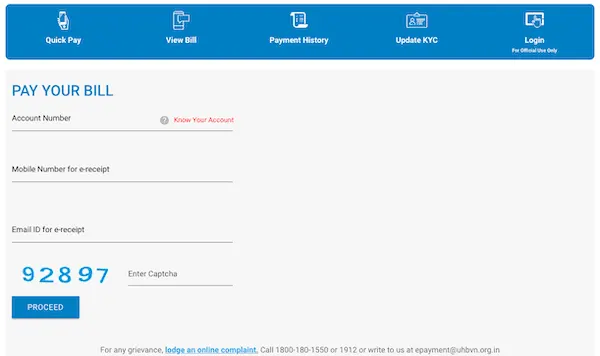
- Go to epayment.uhbvn.org.in and open Quick Pay.
- Enter your account number. If you don’t know it, click Know your Account.
- Enter your mobile number and email to get the e-receipt. The form also asks for your Parivar Pehchan Patra (PPP) number, which is used for government scheme benefits.
- Enter the captcha and click Proceed. Check that the name, address and amount payable are correct.
- Choose a payment method and pay. The portal accepts debit/credit card and net banking through its payment gateways, as well as RTGS/NEFT.
- Save the e-receipt that comes to your email or mobile.
How to pay your DHBVN bill online
- Go to epayment.dhbvn.org.in and open Quick Pay.
- Enter your account number. If you only have an old account number, the portal can fetch your new one. You can also use Know Your Account Number.
- Confirm the bill details, choose a payment method and pay.
How to check your Haryana electricity bill online
Without logging in: on either e-payment portal, click View Bill and enter your account number to see the latest bill.
With an account (to download bills):
- On uhbvn.org.in or dhbvn.org.in, go to My Account → Download Bill / View Bill.
- Log in with your 10-digit account number. An OTP sent to your registered mobile number works as the password.
- Open Bill Summary for past bills, or Payment Receipt for receipts.
If your mobile number isn’t registered, use Update KYC on the e-payment portal first (see below). DHBVN says that if you no longer have your old mobile number, call 1912 or 1800-180-4334 to reset your account.
Pay through UPI apps
Haryana bills can also be paid in Google Pay, PhonePe, Paytm and bank apps. Go to Bills → Electricity, choose Haryana and then UHBVN or DHBVN, and enter your account number. Some apps add a convenience fee, so check the final amount before you pay.
Update KYC: register your mobile and email
The Update KYC page on both portals links your Aadhaar, mobile number, email ID and PPP number to your electricity account, with OTP verification. Do this once. After that, OTP login works and your bill and payment alerts reach the right number. More details are in our guide to electricity bill alerts on SMS and email.
If the website is down near the due date
Both discoms have had e-payment outages before, and they extended due dates when that happened. In March 2026, for example, UHBVN moved bills due on 24 March to 27 March after a technical issue. If you can’t pay online, check the notice on the discom’s home page, or pay through a UPI app.
Helpline and complaints
- 1912: power cuts, billing and other complaints, for both discoms
- UHBVN: 1800-180-1550, epayment@uhbvn.org.in for payment issues, and online complaint registration
- DHBVN: 1800-180-4334, and the Samadhan complaint portal
For outages, see how to complain about a power cut.
Frequently asked questions
How do I check my electricity bill in Haryana? Open your discom’s e-payment portal (epayment.uhbvn.org.in or epayment.dhbvn.org.in), click View Bill and enter your account number.
How do I know whether I am a UHBVN or DHBVN consumer? The discom name is printed on your bill. In general, north Haryana is UHBVN and south Haryana, including Gurugram and Faridabad, is DHBVN.
Where can I find my account number? It is printed on your bill. Both portals also have a Know your Account option.
Payment was debited but the bill still shows due. What now? Check Payment History on the e-payment portal. If the payment isn’t there, contact the discom with your transaction ID: UHBVN at epayment@uhbvn.org.in, or call 1912.
Related: PVVNL / UPPCL electricity bill payment in Uttar Pradesh