Want to check your UP bijli bill (बिजली बिल), download it as a PDF or pay it from your phone? Here is how to do it on the official UPPCL portal and app, step by step. It only takes your account number, and the steps are the same for every power company in Uttar Pradesh.
The old uppclonline.com portal and the Book No. / Connection No. method are gone. All Uttar Pradesh electricity bills (PVVNL, PuVVNL, MVVNL, DVVNL and KESCO) are now viewed and paid on the UPPCL consumer portal, consumer.uppcl.org, or the UPPCL Consumer App. All you need is your 10-digit account number.
Paschimanchal Vidyut Vitran Nigam Ltd (PVVNL) supplies power in western UP, including Meerut, Ghaziabad, Noida, Saharanpur and Moradabad. Like the other UP discoms, its billing runs on the common UPPCL platform. So the steps below are the same whether your bill says PVVNL, Purvanchal (PuVVNL), Madhyanchal (MVVNL), Dakshinanchal (DVVNL) or KESCO (Kanpur).
UPPCL bill payment at a glance
- Official portal: consumer.uppcl.org
- Official app: UPPCL Consumer App (Android)
- What you need: your discom name and 10-digit account number
- Pay with: UPI (BHIM), net banking, debit/credit card or wallet
- Bill by SMS: send
BILL <account number>to 5616195 from your registered mobile - Complaints and help: call 1912
How to pay your UPPCL bill online
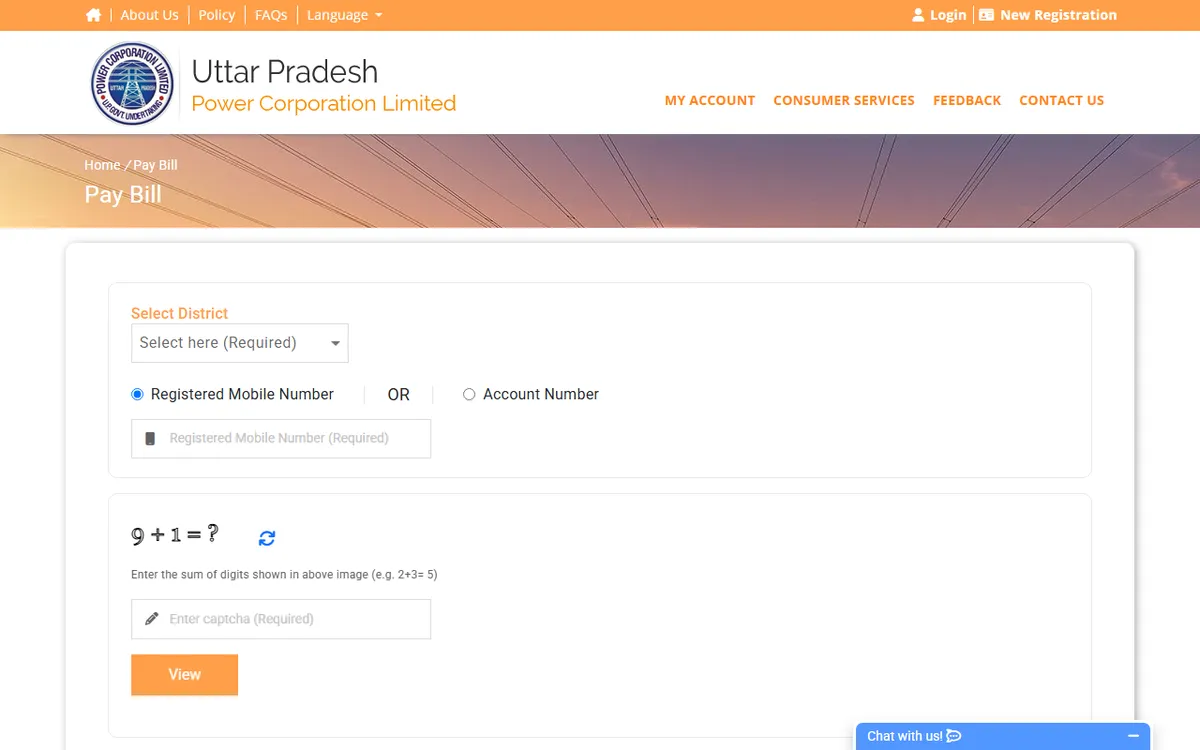
UPPCL consumer portal Pay Bill page (November 2026)
- Open the UPPCL Bill Payment page. You can also go to uppcl.org and click Bill Payment under Consumer Services.
- Select your discom (PVVNL, PUVVNL, MVVNL, DVVNL or KESCo) and enter your 10-digit account number.
- The portal shows your name, due date, the amount payable before and after the due date, and a View button for the bill.
- Choose the payment type:
- Due Bill: the full amount payable
- Part Payment: for in-service consumers, the minimum is 25% of the payable amount or ₹1,000, whichever is higher
- Advance Payment: in multiples of ₹1,000
- Pick a payment mode (Net Banking / UPI, or Card / Wallet) and complete the payment.
- Save the receipt or note the transaction ID.
You don’t need to register to make a quick payment. If you create an account (New User Register on the portal), you also get your bill history, consumption details and payment status in one place.
Transaction charges
These are UPPCL’s portal charges:
| Payment mode | Charge |
|---|---|
| UPI / BHIM, net banking, e-wallet | Free |
| Debit or credit card, bill up to ₹4,000 | Free |
| Debit card (other than RuPay), bill above ₹4,000 | 0.90% of bill + GST |
| Credit card, bill above ₹4,000 | 1% of bill + GST |
Pay through Google Pay, PhonePe or Paytm
UP electricity bills can also be paid in UPI apps through Bharat BillPay. Open Bills → Electricity, search for your discom or “UPPCL”, enter your account number and pay. These apps show the same amount due as the UPPCL portal. A few apps add a small platform fee, so check the final amount before you pay.
Smart prepaid meters
If you have a smart prepaid meter, you recharge instead of paying a bill. Use Smart Meter Prepaid Recharge on consumer.uppcl.org or the UPPCL SMART app (download link from UPPCL). The UPPCL SMART app also shows your remaining balance and daily usage, so you can recharge before the balance runs out.
How to check and download your UPPCL bill
On the portal:
- Go to the Bill Payment page, select your discom and enter your account number.
- Click View next to the bill details to open the current bill, and download it as a PDF.
After logging in: use Bill Summary and Bill Payment History for current and past bills. Each bill has a Download button, and you can filter by date.
In the app: the UPPCL Consumer App, UPPCL’s official app for consumers, is another way to check and pay your bill on your phone.
By SMS: send BILL <your account number> to 5616195 from your registered mobile number to get the bill details.
How to check UPPCL bill payment status
If money left your bank but the bill still shows as due:
-
Last Online Payment Receipt: on consumer.uppcl.org, enter your account number to fetch the receipt for your last online payment.
-
Online Payment Status: log in to the portal and open Online Payment Status. Choose a date range to see each transaction and whether it succeeded.
-
Payment gateway helpdesk: if a payment failed but money was debited, contact the gateway that processed it. Its name is on your transaction:
- PayU: 1800-202-1810, uppcl.support@payu.in
- BillDesk: payment.uppcl@billdesk.com
UPPCL lists the helpdesk hours as 8 AM to 8 PM, except on national and local government holidays.
-
If you paid through a UPI app, check the transaction in that app. Use the Bharat BillPay reference number when you raise a complaint there.
Wait a little before paying again. A payment usually takes some time to reflect, and paying twice only gives you a credit on the next bill.
Where to find your UPPCL account number
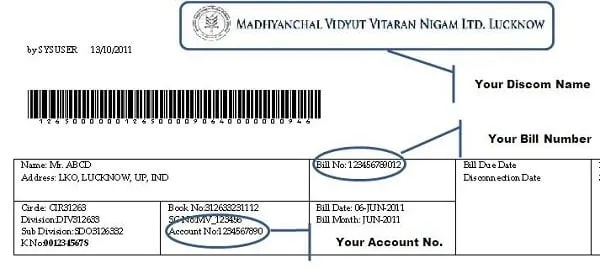
Your account number (also shown as Account ID or K. No.) is printed on your bill. The discom name is printed at the top of the bill. The image above shows an older bill format, but the fields are the same.
- 10 or 12 digits? Urban accounts have a 10-digit account number. Older rural accounts had a 12-digit number, and these are being moved to new 10-digit numbers. If your 12-digit number doesn’t work, use Know Your New Account Number on the portal to find your new one.
- Changed your mobile number? Use Update Contact Details or Update Mobile using Aadhaar on the portal so that OTPs and bill alerts reach you.
- Your bill can also come on WhatsApp or by email. See how to get electricity bill alerts on SMS or email.
UPPCL helpline numbers
| Purpose | Contact |
|---|---|
| Power cut, billing, any electricity complaint | 1912 (also 1912.uppcl.org) |
| Toll-free number for PuVVNL, MVVNL, PVVNL, DVVNL and KESCO (listed on uppcl.org) | 1800-410-1912 |
| SMS complaints | Send PVVNL Nosupply or PVVNL Wrongbill (use your discom name) to 5616195 |
| Unresolved complaints | CGRF complaint portal |
For a power cut, see our guide on how to complain about a power cut.
Frequently asked questions
How do I check my UP bijli bill by account number? Open the UPPCL Bill Payment page, select your discom, enter your account number and click View. It shows the amount due, the due date and the full bill. You don’t need to log in.
Is the UPPCL account number 10 or 12 digits? Urban accounts use a 10-digit number. Older rural accounts used 12 digits and are being moved to new 10-digit numbers. Use Know Your New Account Number on the portal if your old number doesn’t work.
How do I check my smart meter balance? Open the UPPCL SMART app. It shows your remaining prepaid balance and recent usage, and you can recharge from the same app.
Is PVVNL bill payment different from UPPCL bill payment? No. PVVNL, PuVVNL, MVVNL, DVVNL and KESCO all use the same UPPCL portal and app. Select your discom and enter your account number.
Can I pay my PVVNL bill without registering? Yes. On the Bill Payment page, enter your discom and account number and pay directly. Registration is only needed for bill history and other account services.
How do I download a PVVNL bill PDF? Enter your account number on the Bill Payment page and click View. If you have registered, you can also use Bill Payment History, where each bill has a Download button.
I paid but the bill still shows due. What should I do? Check Last Online Payment Receipt or Online Payment Status on consumer.uppcl.org. If the payment failed but money was debited, contact the payment gateway helpdesk with your transaction ID, or call 1912.
Is there a charge for paying by UPI? No. UPPCL charges nothing for UPI, net banking or wallet payments on its portal. Card payments are free for bills up to ₹4,000.
Related: Pay your electricity bill online in Haryana (UHBVN and DHBVN)